
Supported venues
Bybit · Bitget · Binance · OKX
Pro · Live trading
Supported live execution starts on Pro. Review the venue and permissions before assigning a connection to a bot.
Live feature availability depends on the bot, exchange adapter and account state. Simulated accounts stay separate.
Live trading involves risk and can lose money.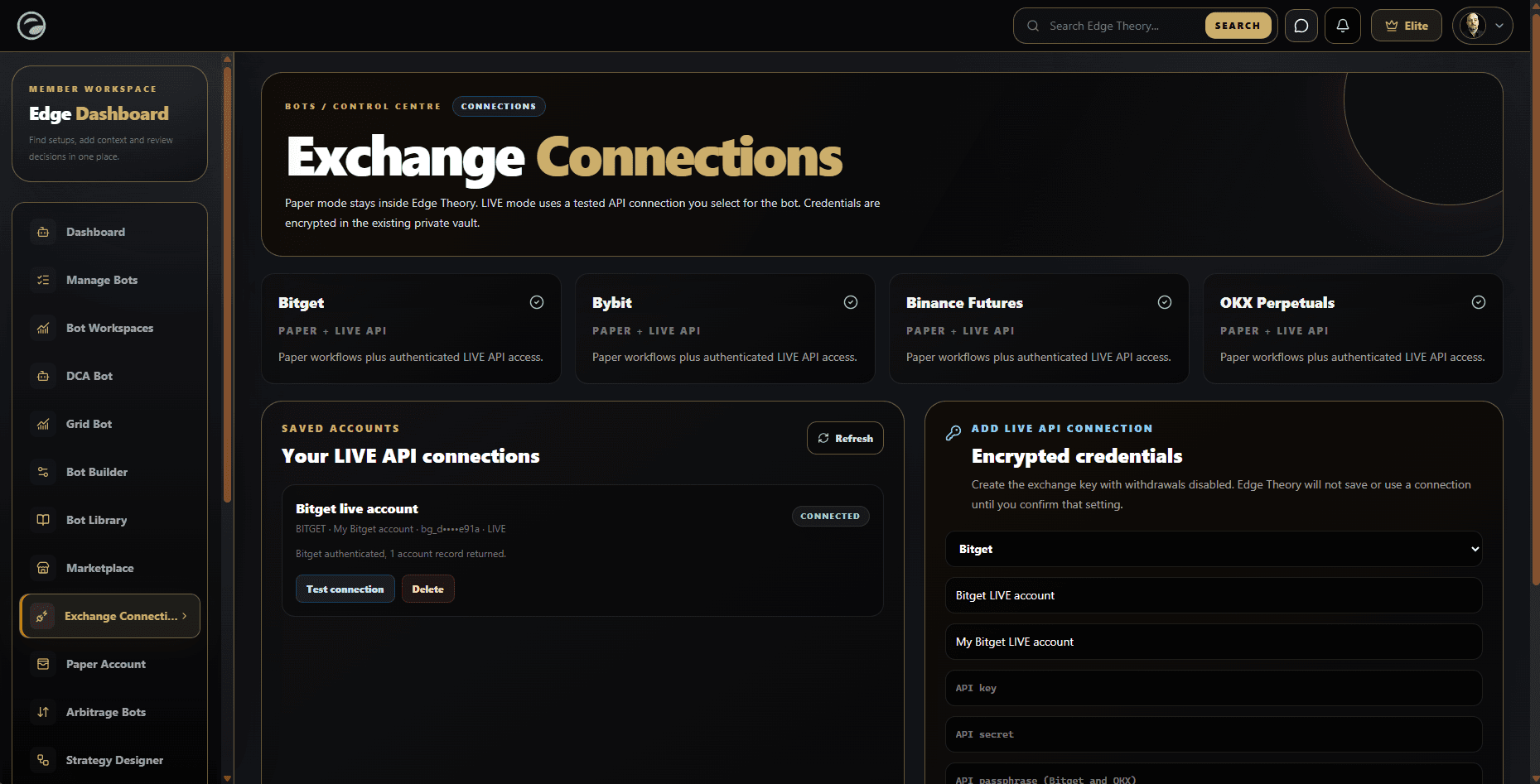
What you can do
Bybit · Bitget · Binance · OKX
Credentials belong to your account and are never included in public listings or community posts.
Confirm execution mode, permissions and supported strategy features before activating.
How it fits
Review the required exchange permissions.
Choose the connection in the intended bot configuration.
Confirm the mode and features before use.
An exchange connection links an eligible Edge Theory Bot workflow to an account at a supported venue. Supported venues and features can vary by Bot, adapter, plan and account state. Confirm the exchanges and permissions shown in your account rather than assuming every venue or strategy can use every connection.
A saved connection by itself does not start a Bot. You still need to select the intended mode and connection in the Bot configuration, review the settings and explicitly activate a supported Live workflow. Simulation remains a separate mode. Check the mode badge and selected account in the Builder each time you create or change a Bot.
Create API keys from the exchange’s official website and follow that venue’s current security instructions. Use only the permissions required for the workflow and keep withdrawals disabled. Protect the key and secret like account credentials. Edge Theory will not ask you to post them in the Community, a review, a screenshot or a support conversation.
Before saving a connection, read the form’s mode and confirmation text. Add the required key fields for the chosen venue, then use the product’s connection test and proceed only if it reports success. If the test fails or shows an unfamiliar status, stop and resolve that issue before assigning the connection to a Live Bot.
A successful connection test confirms only the checks reported by that test at that time. It does not prove that every order type, market, strategy feature or future exchange request will be available. Confirm the Bot’s supported execution features, selected market and account status before activation, and review any risk controls displayed by the configuration.
When a setting is unavailable, do not substitute a guessed value or assume a fallback mode. Read the validation message, correct the selected account or strategy if appropriate and run the connection test again. If the expected control is missing, consult the current help guide or support rather than attempting to bypass a permission or validation check.
After activating a Live Bot, monitor its health, activity, orders and positions from the Bot workspace. Check the timestamps, venue, market and execution mode on records. Keep unresolved events separate from completed fills, and read any reported error before treating the Bot as ready or healthy.
A pause control and connection management are separate from exchange-side account settings. If an execution needs attention, use the Bot’s available pause control and investigate the record. If a credential may have been exposed, revoke it at the exchange promptly and follow the account recovery instructions; do not paste the key into a ticket.
Live orders use real funds and can lose money. Prices can move, orders can be partially filled or rejected, and exchange services can become unavailable. Historical tests and simulated practice do not reproduce every exchange condition. Review position sizing, stop and exit behaviour, venue rules and the amount at risk before enabling any Live workflow.
Keep your own records and compare the Bot’s activity with the exchange account when a result is unclear. Use the exchange’s own interface to confirm account-level state. Edge Theory’s connection status is not a promise that a future order will execute or that an exchange will remain available.
If you change, rotate or revoke an exchange key, check which saved connections and Bots use it. A change at the exchange can make an Edge Theory connection fail its next test. Do not assume that a previously connected Bot can continue normally after a credential, permission or exchange account changes.
Before resuming a paused workflow, verify that the intended connection still passes its test, the Bot shows the expected execution mode and the selected market and risk settings remain correct. Treat a connection error as a reason to investigate, not as an invitation to weaken permissions or bypass validation. When you cannot confirm the state, leave the workflow paused and consult the current guide or support.
Connection availability does not mean every bot feature supports live execution.
Questions and answers
No. You must separately configure, review and explicitly activate a supported Live Bot.
No. Keep withdrawal permission disabled and use only the permissions required for the intended workflow.
No. It reports the checks completed at that time; orders can still be rejected, partially filled or unavailable.